
Inhere
How can one effectively track and utilize excess ingredients from previous shopping trips to avoid purchasing duplicate items?

CHALLENGE
Many people struggle with meal planning and grocery shopping, leading to overbuying, food waste, and inefficient use of time and money.
Insight
Even if people plan meticulously, there are always external factors that can contribute to buying excess groceries such as packaging sizes, sales and promotions, spontaneous plan change, unexpected food spoilage, etc
IDEA
InHere is an app that allows people to plan meals and make grocery lists efficiently by tracking any excess ingredients purchased and automatically deducting them from future grocery lists


01. Sympathize

target audience
.png)
research methods
SURVEY
Participant: 16

OBJECTIVE
Understand people's eating and cooking habits
INTERVIEW
Participant: 16

OBJECTIVE
Understand people's difficulties with meal planning and making grocery shopping list
OBSERVATION
Participant: 16
OBJECTIVE
Understand how people organize their kitchen/fridge/ pantry and see in action what kind of food they tend to stock up on, whether they have any food item they forget about
FINDINGS

1
People don't mind eating the same food for multiple days (2-3) days in a row
4
When in doubt, people tend to overbuy than underbuy.
2
People don't cook new food until they finish what they had
5
When people miss an ingredient, they tend to make it as an excuse to eat out.
3
Most people don't check the fridge before going grocery shopping. They usually make the decision based on their memories.
6
People who don't have notes, often only remember what to buy when they see it.
how might we
.png)
Meal planning
HMW simplify the process of meal planning for users?
.png)
Provide a user-friendly interface that allows users to easily select meals for the week or add their own
Use AI and machine learning algorithms to suggest recipes based on user history and preferences
Grocery shopping list creation
HMW generate a shopping list for the users in one click?
Use an algorithm to automatically generate a shopping list based on the recipes selected by the user
Allow users to manually add or remove items from the list
Inventory tracking
HMW keep track of excess ingredients after each trip to the grocery store?
Ask users to input excess ingredients into the app after each trip
Automatically detect ingredients that are always sold in multiple serving and more than what the recipe suggests (sauce, seasoning, noodles, etc...)
Recipe suggestions
HMW encourage users to use up leftover ingredients/ ingredients that are available in the house?
Use machine learning algorithms to track ingredient usage patterns and suggest recipes that use excess ingredients
Gamify much food and money that have saved over time (rewarding system)
Grocery list organization
HMW help users navigate the store more efficiently and avoid distractions while shopping?
Group items on the shopping list by category and provide a store map or directory
Provide a voice assistant to read the shopping list aloud to the user
Competitve analysis

competitors
Meal planning apps
.png)
pros
-
Provide detailed nutritional information for each recipe, helping users make informed choices about their meals
-
Some apps may also offer personalized recipe recommendations based on dietary preferences, allergies, or past searches.
cons
-
Recipes may not always account for ingredients users already have at home or offer suggestions for using up excess ingredients, which could lead to food waste or unnecessary spending.
-
Useful for organizing tasks and scheduling reminders, including grocery shopping
-
May include features like collaboration with others and task prioritization.
-
Users have to create separate lists for meal planning and grocery
-
Doesn't help with the calculation
-
Still relies on cooking apps for meal planning
Planning and to-do list apps

Cooking and recipe apps

-
Useful for organizing tasks and scheduling reminders, including grocery shopping
-
May include features like collaboration with others and task prioritization.
-
Typically do not include features for meal planning, grocery list creation, or inventory tracking, which may require users to rely on separate apps or tools to organize their cooking and shopping need
SCOPE OF PRODUCT
.png)
SWOT ANLYSIS
.png)
STRENGTHS
WEAKNESSES
OPPORTUNITIES
THREATS
-
Allow users to plan meals and make grocery shopping list in one place
-
Manage and keep track leftover food
-
Suggest recipes to use up those leftovers
-
Provide organized grocery shopping
-
list to save users time shopping
-
Can't account for last-minute plan change
-
Depending on the quality of the ingredients, some ingredients might go bad by the time it gets cooked
-
Packaged food of different brands may have different sizes
-
People are more health-conscious these days and want to cook at home more
-
Partner with supermarkets for grocery pick up or delivery
-
Become a community that promotes a healthy and sustainable lifestyle
-
Inflation drives up prices, making cooking at home no longer cheaper than eating out
-
Compete with trendy and cheap eat restaurants
-
Might not have as many recipes as other established cooking websites

02. Define
user journey

Personas
.png)
Heather Mooney
Age: 37
Location: Seattle, Washington
Job Title: Senior Software Engineer
Income: ~$280,00
Marital Status: Lives with boyfriend

BACKGROUND
With 6 year experience working at Amazon, Heather has led many big projects and received recognition for her leadership. At the age of 37, Heather owns various properties for Airbnb. In the next 6 months, she will officially retire to travel the world. Heather has no plan to marry and have kids
BEHAVIORS
-
Lives a very minimal lifestyle
-
Is not good at cooking and prefers simple meals with little effort
-
Usually does takeout because of her busy schedule
-
Splits cooking with her boyfriend
-
Keeps her house, especially the kitchen very clean
FRUSTRATIONS
-
Unhygienic fridge, especially one with raw meat and perishable vegetables
-
Accidentally consumes expired food
-
Not cleaning the while kitchen while cooking. She's the kind of person who would clean before eating
GOALS
-
Saves time cooking
-
Learns more simple recipes
-
Keeps the fridge and the kitchen sparkly clean with no leftovers
.png)
.png)
03. Ideate

user flow
.jpg)
Due to both time constraints and the project's scope, I only focused on prototyping two major features of the product
sitemap
.png)
04. Prototype
Design system
Design principle

Maintaining consistent visual and interaction design patterns throughout the solution to create a cohesive experience
Consistency
Keeping the design simple and straightforward to avoid confusion and enhance usability
Simplicity
Ensuring that the purpose and functionality of the design is clear and easy to understand
Clarity
Colors
Primary
Semantics
Error
Semantics
Warning
Neutrals


typography

Grids

Components
UI Design
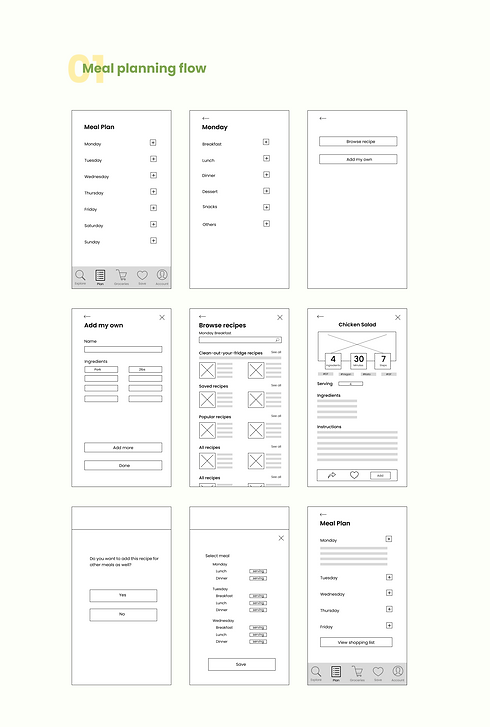
Wireframe

UI Design

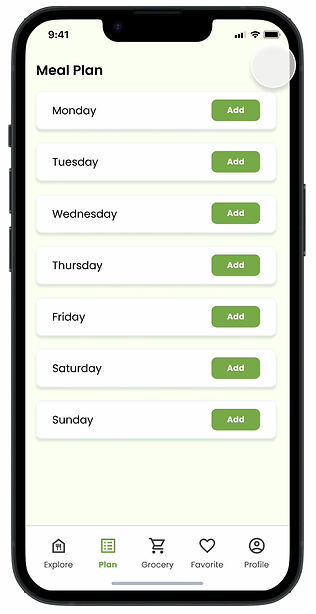
Select day
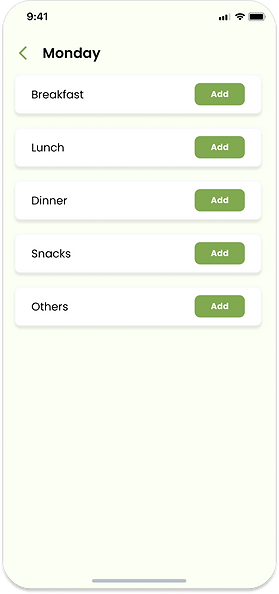
Select meal type
01
Meal plan

Ways to add
Give people option to add their own in case they don't find what they like

Filter by preferences
Display first clean-your fridge recipes if users have any leftover ingredients
Display second user's favorite or often cooked recipes
Browse recipe
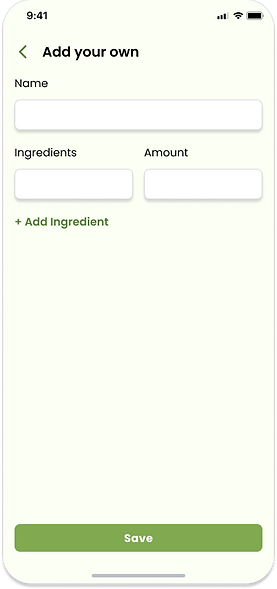
Manually added ingredients will also get added to shopping list
Add more ingredients
Add your own
Recipe summary
Grocery list will account for serving size

Ingredients view

Switch button
Instruction view

Shortcut to add the same recipes to multiple meals

Default
Select date

Expand
Select meal type and serving size for duplications
UI Design

Allow edit and go back to selected recipe
Meal planning cart
02
grocery

Organize ingredients by aisle so they can shop more efficiently
Allow users to manually add more ingredients
Allow users to buy other household essentials beside food
Auto-generated grocery list

Confirm purchase
After users went grocery shopping, if they purchased anything more than suggested, they have the option to input the excess amounts for the app to automatically deduct them from future grocery lists.
According to primary and secondary research, the major reason people overbuy is because there are things that people can't buy exactly the amount they need, such as: spice, noodles/rice/legumes, milk, canned food, etc.
These ingredients are worth usually months of food. If people don't recycle the dish regularly, they tend to forget them.
Allow users to skip if they have nothing to correct or simply don't want to answer

Notify users items that were adjusted based on potential availability at home
Radio button for users to keep track of the list when go grocery shopping
Users can also click on each item to view details
Auto-generated grocery list

Allow users to edit ingredient’s name, amount, and category
Only display for items that have adjusted amount
Allow users to enter the correct amount, for ex, if users skip any meals last week
Recommend substitution to avoid buying things they don't need
Ingredient details

Complete shopping
Plan next meal
prototype
05. Test and Reflect
Test objective
The primary focus was on evaluating the app's usability, efficiency, and overall user experience.

Evaluate the app's user interface and interactions to ensure it is intuitive, easy to navigate, and user-friendly for all types of users
Validate the effectiveness of the unique feature of tracking excess ingredients

Ensure that the app efficiently meets users' meal planning and grocery shopping needs.
02
03
01
A diverse group of participants, including individuals with varying cooking and grocery shopping habits, were selected to test. The test phase utilized a combination of usability testing, interviews, and surveys to collect both qualitative and quantitative data from users.
Learning
A diverse group of participants, including individuals with varying cooking and grocery shopping habits, were selected to test. The test phase utilized a combination of usability testing, interviews, and surveys to collect both qualitative and quantitative data from users.
Positive User Reactions
-
Users appreciated the concept of meal planning and found the automatic deduction of excess ingredients from future grocery lists to be a valuable and time-saving feature.
-
Participants acknowledged that the app's unique selling point could potentially revolutionize their meal planning and grocery shopping routines.
More intuitive navigation between tabs
-
Some users found the navigation and app layout confusing, hindering their ability to efficiently plan meals and manage grocery lists.
-
Simplifying the user interface and improving the overall app flow were necessary to provide a seamless user experience.
Additional functions and shortcuts for repetitive actions
-
Most users expressed they would like more functions to help with duplicating recipes as they prefer to have a simple meal plan and don't mind duplications.
-
Allow users to reset the "plan" tab at any time, directly from the tab instead of having to do that from the "grocery" tab.
reflections and next steps
This project presented a significant challenge as I had to undertake every step of the design process independently, from conceptualization to prototyping and testing
Creating the initial prototypes for two out of five features of the app and conducting usability testing provided valuable insights into the user experience. As I move forward to prototype the remaining features, consistency in design and addressing user concerns will be my focus. However, I am mindful of limitations, such as the accuracy of ingredient tracking and data security, which I plan to address.