
abracamdabra
How can one take better selfies without being hard on themselves?

CHALLENGE
Taking selfies can be a daunting process, and often involves awkwardness, lack of control over the body, and taking multiple pictures only to select one.
Insight
If a perfect image is not captured, it affects the person’s satisfaction towards how they appear and self-esteem. At the same time, using app filters can instill a toxic mindset about how people perceive their own image.
IDEA
Using algorithms to learn about user's selfie habits and give them live suggestions to take better selfies
About this project
Choreography experience design
AbraCAMdabra is a choreography - based design project. Choreography experience design is an approach that merges the art of choreography with the principles of UX design by applying choreographic techniques and concepts to digital experiences. Drawing inspiration from the rhythm, flow, and storytelling of dance, this project strives to deliver immersive and engaging experiences that go beyond functionality. Through the fusion of choreography and UX design, I aim to revolutionize the way users interact with technology, providing them with immersive, intuitive, harmonious, and unforgettable digital encounters.
UX Design
-
Flow
-
Rhythm
-
Movement
-
Timing
-
Emotional engagement
choreography
01. Research
Primary research

We observe how 30 people take selfies
And clearly, they have all kinds of problems.
How do people take a selfie?
1
Problems with lighting
2
-
Some people can’t recognize backlit
-
Lighting is too bright (shadow) or too dark (low quality)
3
-
Deciding whether or not to smile
-
Deciding whether or not to make a weird/funny face
4
Problems with posture - facial expression
Problems with angles
-
Face angles (left-right)
-
Camera angles (high - low)
-
Camera position (vertical-horizontal)
-
Distance from the camera (face too close)
Logistics/ personal problems
-
Taking only one photo (not a selfie person)
- Don’t see the point of taking a selfie
-
don't have needs to public it (social media)
-
shy when taking selfies in public
-
-
Insecure about their appearance
-
bad hair/skin day, etc
-
-
Not in the right mood
-
Find getting a good shot is time-consuming
SECONDARY RESEARCH
Social Media Dysmorphia
Studies have shown that app filters are making us lose touch with reality because we expect to look perfectly primped and filtered in real life. The more people use filters, the more they become obsessed with their flaws and hate themselves for it.
toxic beauty standard
Photo editing and app filters make every face look alike. They quietly set a beauty standard that people compare themselves against. Such automated edits fundamentally cultivate a culture of unobtainable beauty standards, which in turn leads to more extreme urges to manipulate our image.
cosmetic surgery
Photo-editing drives people to redesign themselves. People historically came to cosmetic surgeons with photos of celebrities whose features they hoped to emulate. Now, they’re coming with edited selfies.
02. Ideate
live
suggestion?
what if there is
Using algorithms to learn about user's selfie habits and give them personalized live suggestions to take better selfies
Live suggestions help people take better selfies so that
-
They don't have to use app filters
-
They don’t have to edit photos later
-
They don’t take too many photos and nitpick with every photo they took
-
They can feel comfortable in their own skin
Testing plan
what
step 1
Observe how participants take selfies before design intervention
step 2
Explore participants' criteria for a good selfie
step 3
Cater the messages
how
Ask participants to take as much time as they need until they are satisfied with the photos.
Ask participants to submit 5-6 favorite selfies they have taken in the past
Analyze participant's favorite selfies and the mistakes they tend to make that conflict with their goal
why
Understand people's selfie-taking behaviors and their struggles
Look for patterns from their favorite selifes
Personalize the messages to maximize people's satisfaction with the results.
Observe how participants take selfies with the design intervention messages
step 4
Prototype different ways to send instruction messages
Explore the most effective way to communicate with the selfie-taker.
Explore if instruction messages influence people's behavior.
step 5
Collect feedback
Interview participants
post-testing
Learn how likely people would continue using the feature.
Testing methods
How to give live suggestions?
Wizard of Oz
Wizard of Oz is a technique used in the early stages of product development to simulate the functionality of certain features without actually implementing them. In this case, instead of implementing an automated algorithm to offer live selfie recommendations, a human "wizard" would observe the user's selfie-taking process and provide guidance in real time.
Text message
Gestures
Voice
Sending on-screen text messages to people's phone
Use facial expressions, hand gestures, and body language to give posing example or indicate need for adjustment
Speaking directly to people to give feedback and suggestions.
Michelle case study
step 1
Ask participant to take as much time as they need until they are satisfied with the photos to observe habits.
step 2
Ask participant to submit 5-6 favorite selfies she has taken in the past to look for patterns.


Compare participants' favorite selfies and the mistakes they tend to make that conflict with their goal to personalize the suggestions.
step 3

-
Left angle
-
Eye-level camera
-
Pull hair to the side for more volume
favorite pose
_edited.jpg)
unaware
habit
-
Look straight
-
Low camera
-
Constantly fixing hair
step 4
Send personalized instruction messages
.png)
.png)
"Look left, it's your favorite angle!"
-
Techinical suggestion
"Of all your curves,
your smile is my favorite one!"
-
Light-hearted suggestion
.png)
"Lower your camera, it's too early to get high!"
-
Combination
step 5
-
Users find instructions helpful. 100% followed suggestions.
-
When we send on-screen messages, users find the texts too small to read.
-
Instructions should be short and straightforward. Otherwise, it would be distracting.
Findings
design implication
SIGNS
Signs are used for directing
exact movements such as angles, distance, smile shapes, and more.
TEXTS
AUDIO
Texts are used for general suggestions such as lighting, background, or for personal messages to make people relax and enjoy the process of taking selfies.
People have the option to
combine audio with texts or signs to improve the experience.
03. Design
A camera add-on that has 3 modes
Auto
Select
.png)
The algorithm generates a complete selfie template
-
Beginner-friendly
-
Save time
Users select details they need help with
-
More flexible
-
Make more variety of photos
Users have an option to combine audio with texts or signs to enhance the experience
-
Personal and trustworthy
-
Easy to follow instructions
Auto
Default
Auto
Selected
Select
Default

Select
Selected
auto

The algorithm generates a complete selfie template
-
Beginner-friendly
-
Save time
Auto
SELECT
Users select details they need help with
-
Smile
-
Angle
-
Distance
-
Personal messages
-
Others

select
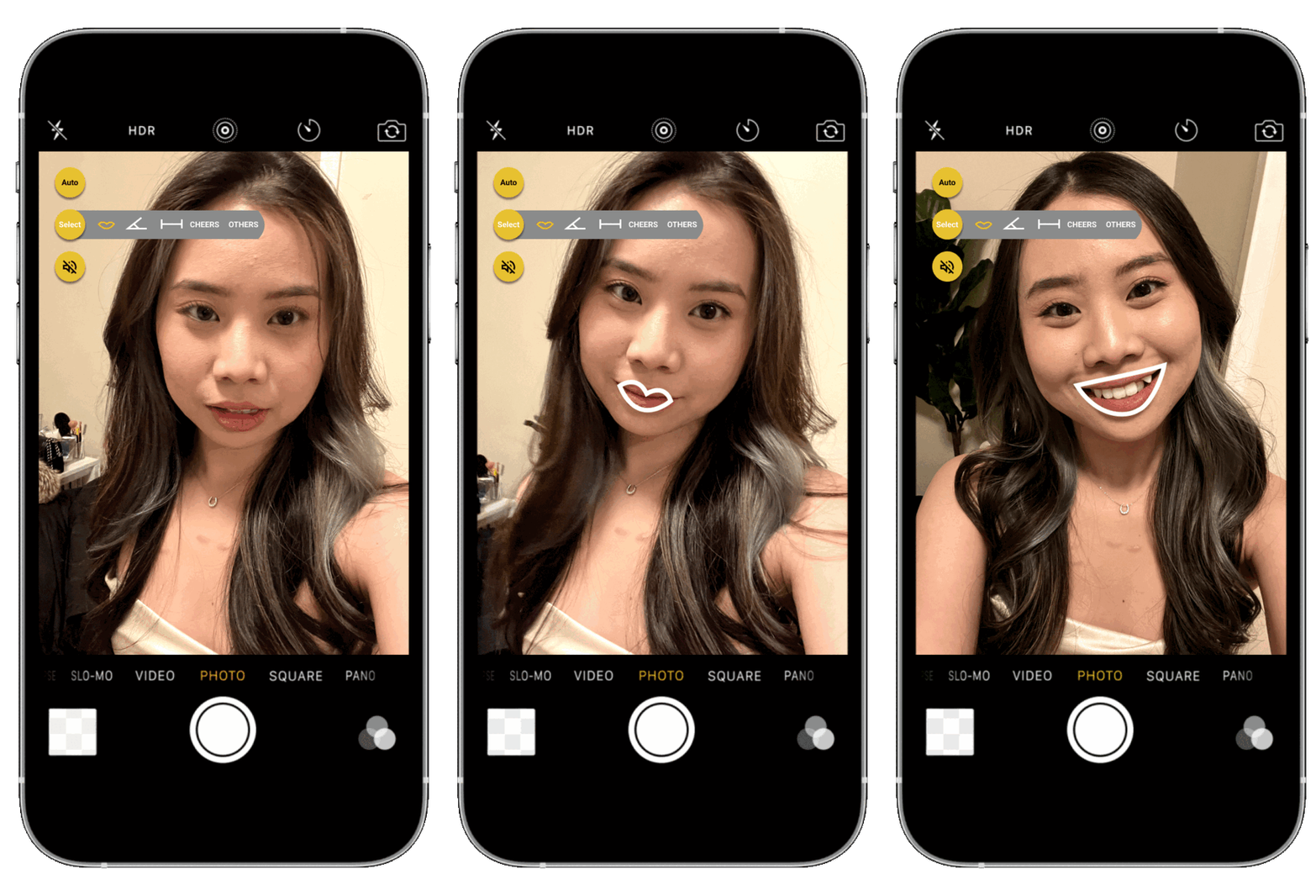
SMILE
.png)
The algorithm suggests the user's favorite smile shape


select
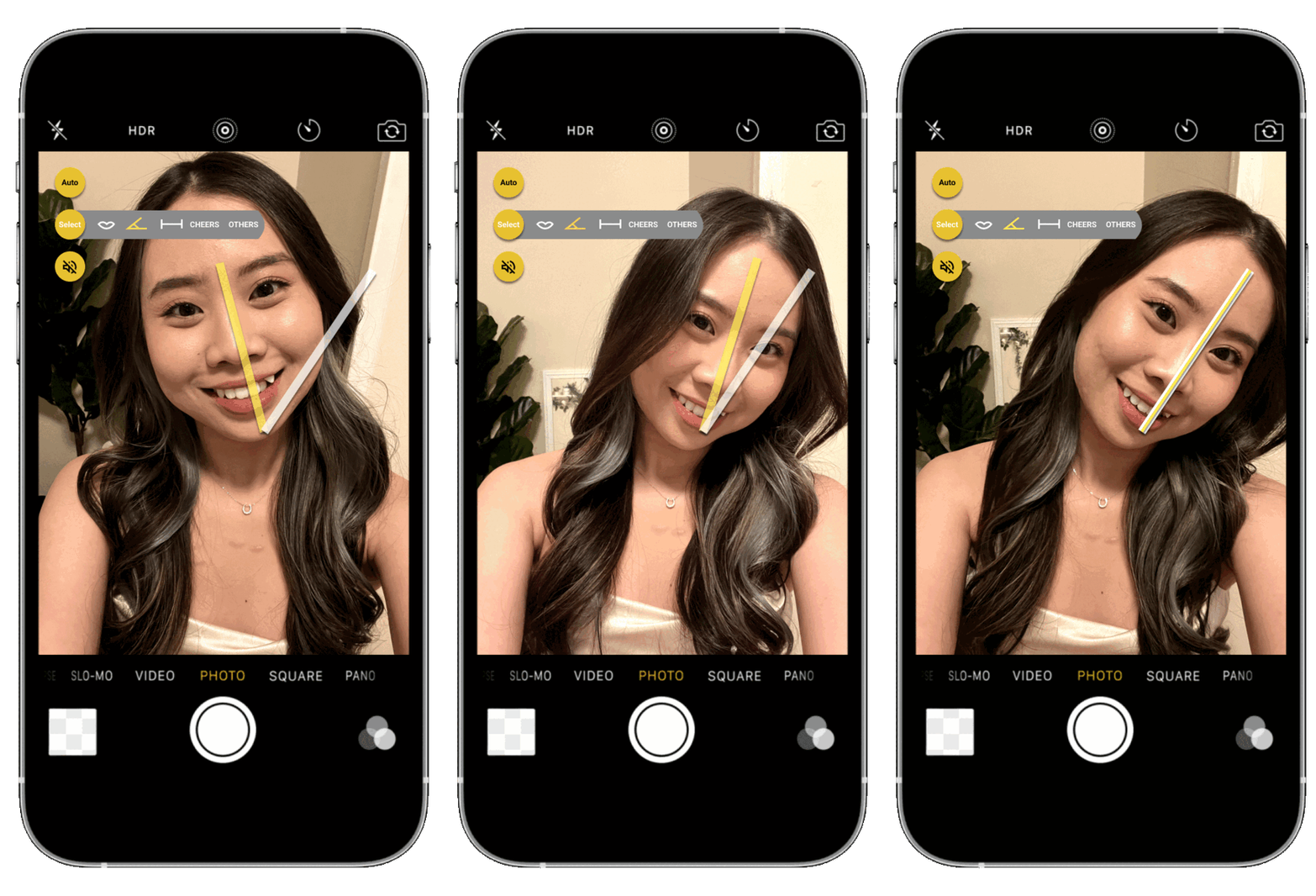
ANGLE
Current
Ideal
The algorithm suggests the user's favorite angle

30

0
select
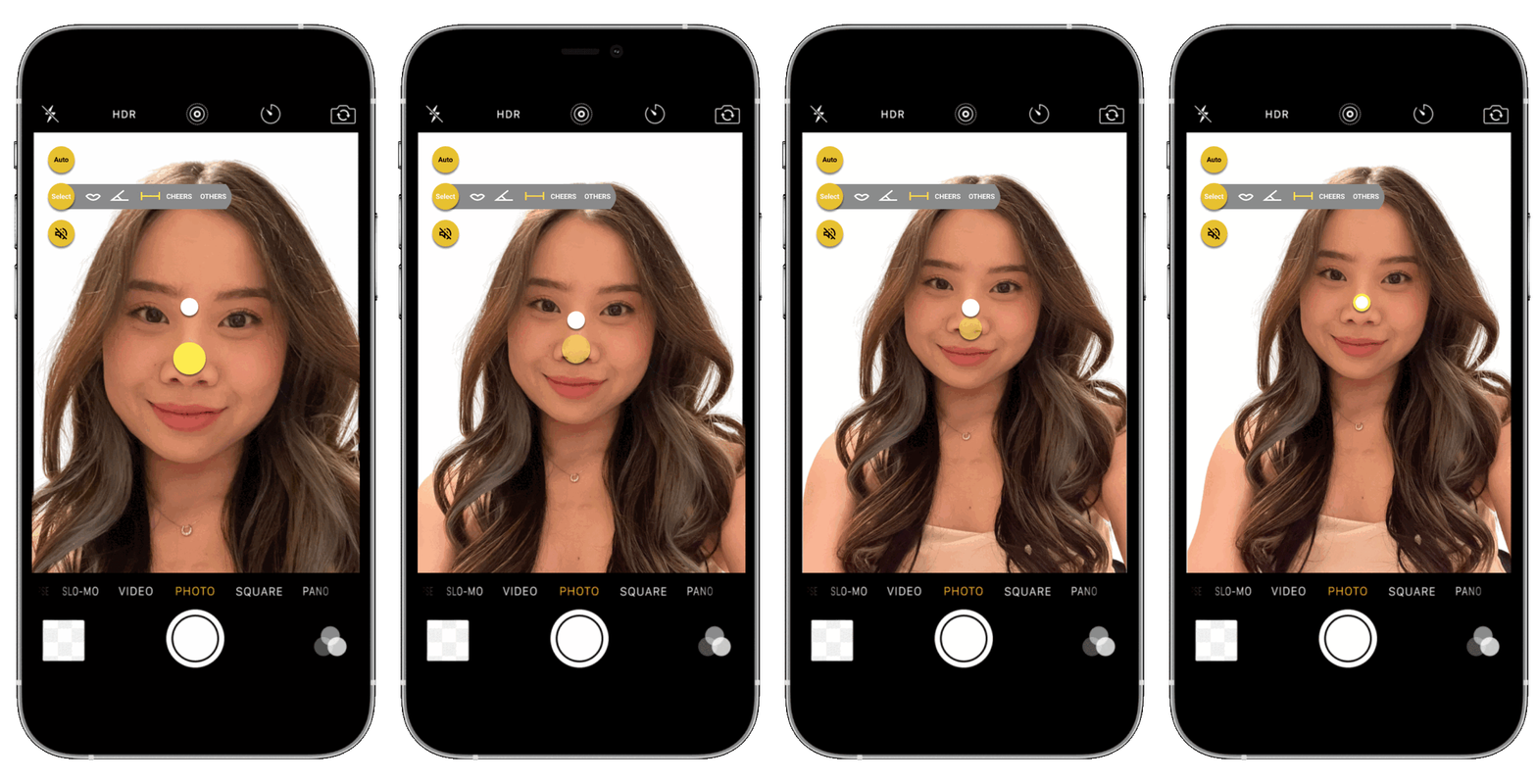
distance
.png)
Current
Ideal
The algorithm suggests the user's favorite distance
Move the camera closer

Different distances to try


Perfect distance
Move the camera farther

select
cheers
.png)
Light up the user's mood with
-
Funny jokes
-
Self-love reminders
-
Better photos come from within.


select
others
.png)
Other general suggestions such as:
-
Lighting
-
Background
-
Camera position


audio
Default
Selected
Users have an option to turn on the audio together with auto or select mode to enhance the experience
-
Feels personal and trustworthy
-
Makes instructions clearer and easy to follow
-
Might feel awkward, especially in public
-
Too much instruction might sound demanding
pros
cons
Only audio
Audio with signs
04. Next steps
Moving forward, my next critical focus is to explore and prototype the mechanisms to access users' selfie habits and preferences, enabling the feature to provide personalized recommendations accordingly. To achieve this, the plan is to design a user-friendly data input process where users can submit 4-5 examples of their favorite photos, allowing the feature to learn their preferred pose, angle, lighting, and more. Leveraging user-generated data helps refine and enhance personalized selfie recommendations, empowering users to capture their best shots effortlessly.